The real cost of running agentic AI, and how not to go broke
Agents loop, and every loop resends everything. Where the tokens actually go, how prefix caching claws most of it back, which benchmarks matter when you pick a model, and a router you write yourself.
“The pricing looked fine until the invoice arrived.”
This post started as notes I kept while building a production agentic system. Somewhere between the pricing page and the first real invoice, my mental model of what an LLM call costs fell apart. This is what I wish someone had told me earlier.
Three levers: caching (the one everyone skips), model selection (harder than it looks) and routing (the underrated one). Prices below are the ones I had in front of me at the time of writing, April 2026. They’ll move. The shape of the problem won’t.
the mental model is wrong from the start
When people estimate LLM costs, they picture a chat. The user sends a message, the model answers, repeat. A few hundred tokens in, a few hundred out, multiply by the price, done.
That works for a chatbot. For an agent it’s off by a couple of orders of magnitude, because an agent doesn’t make one call per question. It makes one call per step, and every step resends everything the model needs to stay coherent:
- the system prompt: instructions, tool schemas, behaviour rules. Usually 500 to 2,000 tokens.
- the conversation history: every prior message and response. It grows every step. Even with compression (you’ll need it eventually), 30k to 40k tokens is easy once a conversation drags on.
- the tool calls: the arguments you sent and the results you got back. One web search can drop 5,000 to 15,000 tokens of raw page into the context.
- the reasoning: if the model thinks before acting, that thinking rides along into the next step too.
Side by side: six chatbot calls, each about 600 tokens and barely visible, against six steps of one agent run. The agent's bars stack system prompt, conversation, tool results and reasoning, growing from 3k tokens at step 1 to about 25k at step 3 and 60k at step 6.
Step 1 might be 3,000 tokens. By step 3 you’re at 25,000, and by step 6 at 60,000. This isn’t an edge case. Every agent behaves like this, because the model needs the full history to know what it’s doing.
Claude Code, one of the more production-ready coding agents around, regularly burns 100,000 to 200,000 tokens per turn on hard tasks. I’m fairly sure that’s part of why Anthropic’s subscription is heavily subsidised: at that scale, the raw API economics don’t close for most consumers.
Here’s one question, priced. Five steps, 25,000 input tokens and 1,000 output tokens per step, Claude Sonnet at $3 per million input tokens and $15 per million output:
input:  5 × 25,000 × $3/M   = $0.375
output: 5 × 1,000  × $15/M  = $0.075
one agent run                 $0.45
$0.45 for one user question. At 150 questions a month, which is realistic for an agentic tool, that’s $67.50 per user per month in API costs alone. If you planned to charge €15 a month, that’s not a business, that’s a donation. Play with it:
An interactive calculator. Sliders set the number of steps, the context size, how much the context grows per step and runs per month; a toggle turns prefix caching on. With the defaults (5 steps, 25k tokens, no growth, 150 runs) one run costs $0.45 and one user costs $67.50 a month, far above a €15 plan (about $17 at an assumed 1.15 $/€). Turning caching on drops one run to $0.18.
what caching actually does
Look at two consecutive steps of the same run and they’re nearly identical. Same system prompt, same tool schemas, same history. Only the last few thousand tokens are new: the latest tool result, the latest bit of reasoning. So why pay full price again for tokens you sent a few seconds ago?
That’s what prefix caching is for. If the beginning of your prompt matches a recent request from the same account, those tokens come out of a cache at a reduced rate, typically 75 to 90% cheaper than normal input.
How you turn it on depends on the provider.
OpenAI does it automatically, nothing to configure. The minimum is 1,024 tokens, which any real agent clears. The cache key is the exact byte sequence of your prompt’s beginning, so the only rule is to keep that beginning stable. Dynamic stuff goes at the end. Don’t put timestamps or user ids at the top of your system prompt, because that breaks the match on every request. If you really need a timestamp, normalise it (round it to the day, say). I’ve also seen people try to manage cache names by hand. Don’t bother, the automatic system does it better.
Anthropic wants explicit cache_control markers on the blocks you want cached:
messages = [
    {
        "role": "user",
        "content": [
            {
                "type": "text",
                "text": full_conversation_history,
                "cache_control": {"type": "ephemeral"}  # the stable boundary
            },
            {
                "type": "text",
                "text": new_user_message  # dynamic, not cached
            }
        ]
    }
]
There’s a minimum cacheable length here too, between 1,024 and 4,096 tokens depending on which Claude model you call. Worth knowing: if your prompt is under it, nothing gets cached, marker or not.Anthropic also charges a little extra the first time it writes a block to the cache. Over a multi-step run the cheap reads win by a mile, but a single one-off call doesn’t get cheaper.
Most others (Gemini, Qwen, Kimi, GLM) cache prefixes automatically, like OpenAI. Same discipline: stable stuff first, dynamic stuff last.
Here’s the same five-step run with caching, where each step’s context grows by 2,000 tokens and cached tokens cost 10% of the normal price ($0.30 per million):
step 1: 25,000 tokens, cold, full price            $0.075
step 2: 27,000 tokens, 25,000 cached at $0.30/M    $0.014
step 3: 29,000 tokens, 27,000 cached               $0.014
step 4: 31,000 tokens, 29,000 cached               $0.015
step 5: 33,000 tokens, 31,000 cached               $0.015
input total with caching                          ~$0.133
input total without caching, same growing context  $0.435
About 70% off the input bill, with no change to the model, the prompt or what the user sees.
what breaks the cache
Before you celebrate, check that it’s working. Look at cache_read_input_tokens in the usage block of the response:
usage = response.usage
print("prompt_tokens:", usage.prompt_tokens)
print("cache_read:", getattr(usage, "cache_read_input_tokens", 0))
# if this is always 0, caching is not working
I once ran a whole production test convinced caching was on. It wasn’t. A session id injected into the system prompt was changing the first few tokens of every request, so nothing after it ever matched. (wth 🥲)
Two consecutive requests drawn as blocks: system, tools, history, tool result, then two new blocks on the second request. In the first scene the prefix matches up to the new blocks, so 26,000 of 28,000 tokens are read from cache. In the second scene a timestamp at the top of the system prompt differs, the match stops at the very first block and nothing is cached. In the third scene the timestamp is rounded to the day and the full prefix matches again.
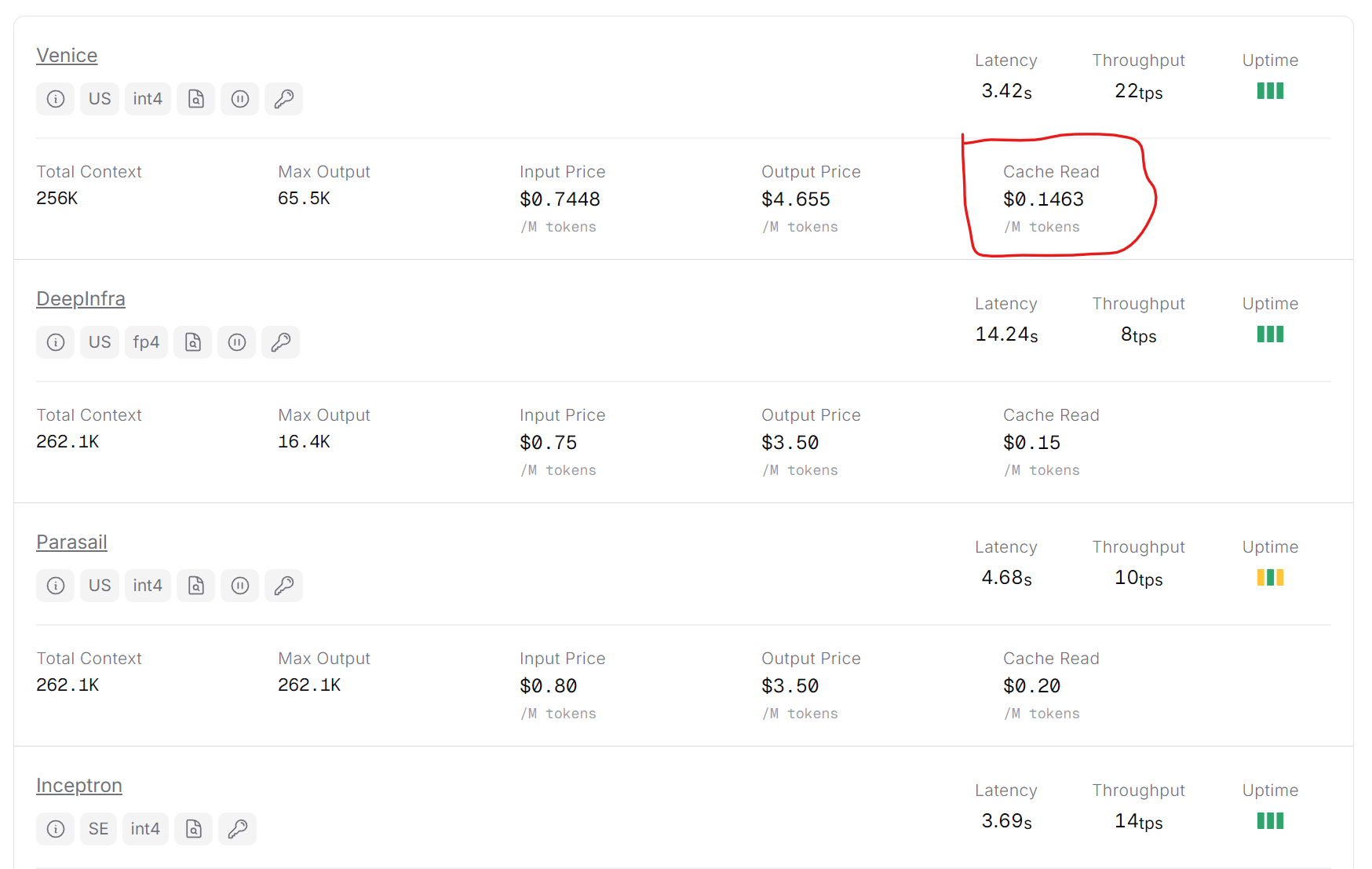
One more trap if you go through OpenRouter: check that the provider serving your model actually offers prompt caching. Some don’t, for the same model.
picking models on benchmarks that matter
Once the cost picture makes sense, the obvious next move is to find a model that caches, performs well and doesn’t cost a fortune. This is where the second mistake happens: optimising on price alone, then watching the agent fail in creative ways. For agents, four things matter more than the leaderboard headline.
Coding. Look at SWE-bench Pro, not SWE-bench Verified. Verified has been heavily contaminated through training data, and OpenAI stopped reporting it for that reason. A model scoring 73% on Verified can score 25% on Pro. Terminal-Bench 2.0 is closer to reality for execution-heavy work. If your agent runs code, these numbers matter more than anything else.
Instruction adherence is chronically underrated. IFBench tests following several constraints at once, including negative ones (“do X but never Y”). A model that adds preambles nobody asked for, or “improves” things you didn’t want touched, will annoy users however well it reasons.
Tool use efficiency, by which I mean the opposite of tool spam. Good agentic models call a tool once with the right arguments and move on. Weaker ones double-check everything, re-confirm results they already have and narrate between calls. That bloats the output, inflates the next step’s input and slows everything down. τ²-bench (tau-bench) is the one to watch, because it measures stability over many turns of tool calls, not single-call accuracy.
Verbosity is a cost axis in its own right. A model that writes twice as much as needed doubles your output cost, then adds those tokens to every later step’s input. Over a ten-step chain that compounds fast. Measure it on your own workload; benchmark numbers don’t predict real output length very well.
which models I’d look at (april 2026)
OpenAI and Gemini sit at the top for real-world agent reliability. GPT-5.4 mini gets 60% on Terminal-Bench 2.0 and 72.1% on OSWorld (computer use), benchmarks that test finishing real tasks in real environments. Gemini 3 Flash scores 78% on SWE-bench Verified and has been called out as solid for production coding loops by JetBrains, Devin and Cursor. Both cache automatically. They’re predictable, fast and well documented, the sensible default if reliability comes first.
Chinese models are closing the gap faster than most people realise, at prices that make consumer AI products suddenly viable:
- Qwen 3.5 Plus: $0.26 in / $1.56 out per million tokens, #1 on IFBench globally, 1M context window. When instruction following matters, it’s hard to beat at that price.
- GLM-4.7: leads open-source tool use on τ²-bench. It has a feature called Preserved Thinking that keeps its reasoning across tool calls, so the model doesn’t forget its plan when a tool returns. Handy for agents that keep losing the thread.
- DeepSeek V3.2: the cheapest model with genuinely frontier-level reasoning, trained on 85,000 complex agentic prompts across 1,800 environments. Very verbose by default though, which costs real money at scale. (V4 is supposed to land any day as I write this. What a time.)
Then there’s MiniMax, Kimi, and the list keeps going. Honestly they’re all close on both quality and price, so test a few on your own tasks before committing.
The easy way to try all of them is OpenRouter: one API, usage analytics, automatic fallbacks, and switching models is a one-line change. One tip that matters in production: add :nitro to the model id (qwen/qwen3.5-plus-02-15:nitro). Nitro sends your request to the fastest provider instead of the cheapest, and in an interactive agent loop latency compounds across steps.
A GDPR note if your users are in Europe: the Chinese models store data on servers in China. For a French product that’s a real compliance question. Gemini and Mistral are the GDPR-safe options with serious performance at reasonable prices.
routing, or don’t take the ferrari to the supermarket
The third lever ties the other two together. Most queries don’t need your best model. “Summarise this document” and “refactor this whole module to async and update the tests” are very different jobs, and routing means telling them apart automatically and paying accordingly.
There are ready-made options. RouteLLM, from LMSYS (the Chatbot Arena team), trains a small classifier on human preference data to predict when a strong model is really needed; they report 85% lower cost on MT Bench while keeping 95% of GPT-4’s quality. OpenRouter has its own router (openrouter/auto), and Not-Diamond sells one.
They all share one problem: you don’t control where they send things. You’re trusting someone else’s idea of “good”, tuned for someone else’s product. For a product with specific domain needs, that’s a real limit.
So I use a fast, cheap open-weight model as my own router: openai/gpt-oss-120b:nitro on OpenRouter. It runs at 400 to 500 tokens per second on Cerebras, so the 20 tokens of a routing answer take about 40ms to generate, well under what a person notices. At $0.039 in / $0.19 out per million tokens, a call costs next to nothing. And I write the routing prompt myself:
from openai import OpenAI
import json

client = OpenAI(
    base_url="https://openrouter.ai/api/v1",
    api_key="your_openrouter_key"
)

ROUTING_PROMPT = """You are a request complexity classifier.

Classify into one of three tiers:
- "fast": simple questions, short summaries, lookups, formatting
- "standard": multi-step reasoning, code explanation, moderate research
- "complex": large refactors, deep reasoning, ambiguous multi-constraint tasks

Return JSON only: {"tier": "fast"|"standard"|"complex"}"""

def route(user_message: str) -> str:
    response = client.chat.completions.create(
        model="openai/gpt-oss-120b:nitro",
        messages=[
            {"role": "system", "content": ROUTING_PROMPT},
            {"role": "user", "content": user_message[:500]}
        ],
        response_format={"type": "json_object"},
        max_tokens=20
    )
    return json.loads(response.choices[0].message.content)["tier"]

MODELS = {
    "fast":     "openai/gpt-oss-20b:nitro",
    "standard": "qwen/qwen3.5-plus-02-15:nitro",
    "complex":  "anthropic/claude-opus-4-6:nitro",
}
Call it 500 tokens in and 20 out: 500 × $0.039/M + 20 × $0.19/M ≈ $0.000023 per routing call, so routing 1,000 messages costs about $0.023. (With the short prompt above and a 500-character message it’s closer to half that.)
Twenty requests walk through a router box one by one and get sent to one of three lanes: fast (gpt-oss-20b), standard (qwen3.5-plus) or complex (claude-opus-4-6). Fourteen go to fast, five to standard and one, a large refactor, to complex. A counter adds up the routing cost at $0.000023 per request.
The real win over a black-box router is that you decide what “complex” means. A legal research tool and a coding assistant draw that line in very different places. You can add your own signals (is there a code block? an attachment? a specific keyword?) without retraining anything, because it’s just a prompt.
With this setup about 70% of my requests go to the cheap model, 25% to the mid tier and 5% to the frontier one. Blended cost per message ends up roughly 60% lower than sending everything to the expensive default.
take-home
- Check
cache_read_input_tokens. If it’s always 0, something at the start of your prompt changes every request, probably a timestamp or a session id. - Pick models on SWE-bench Pro, τ²-bench and IFBench, then measure verbosity on your own traffic.
- Write your own router. A dozen lines and a prompt, about $0.000023 a call.
What you’re after is the right model for each request, with everything it shares with the last one already sitting in the cache.